



Description
Download EF System Monitor – System Monitor, System Information, Remote Monitoring, Windows Tool, System Utility, PC Performance
Overview
EF System Monitor is a Windows-based system utility designed to deliver real-time insights into critical system metrics. The application serves as a centralized dashboard for monitoring operating system version, memory usage, hard drive status, and RAM performance. Its primary purpose is to simplify system oversight, enabling users to quickly assess the health and performance of their local or remote machines. This makes it particularly valuable for IT professionals, network administrators, and advanced users managing multiple systems.
By presenting essential data in a clear, accessible format, EF System Monitor helps users identify performance bottlenecks, anticipate storage issues, and maintain optimal system stability. The tool is especially effective in environments where consistent monitoring is required, such as server rooms, development labs, or shared workstations. It supports remote device monitoring via TCP network connections, expanding its utility beyond single-machine oversight.
Developed by EF Software, the application reflects a focused approach to system diagnostics, emphasizing clarity and functionality. While specific details about the developer’s background were not provided, the tool’s structured design and targeted feature set suggest a technical foundation aimed at efficiency. Real-world use cases include proactive troubleshooting, performance tuning, and remote system health checks. In the broader ecosystem of system tools, EF System Monitor fills a niche for lightweight, customizable monitoring solutions tailored to Windows environments.
Key Features & Functionality
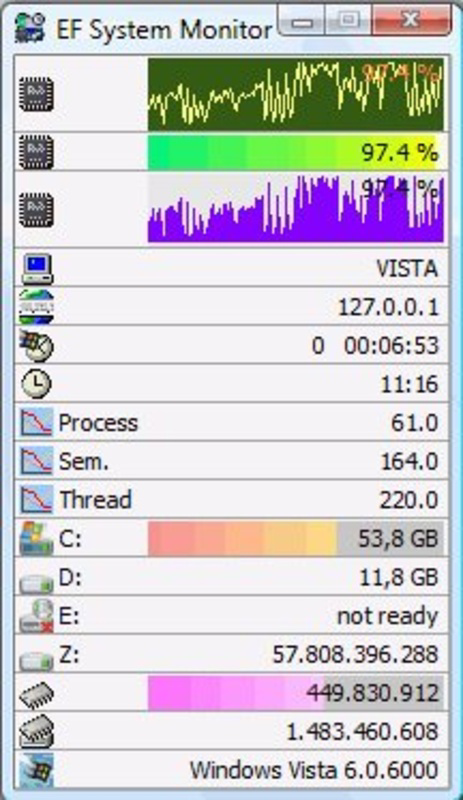
- System Information Display: EF System Monitor provides a real-time panel showing core system details such as OS version, computer name, username, and RAM status. Memory and hard drive usage are displayed as percentage indicators, allowing users to instantly gauge resource availability.
- Remote Monitoring Capability: The application supports connections to remote systems over TCP networks, enabling administrators to monitor multiple machines from a single interface. This feature is ideal for managing distributed or networked environments without requiring additional software on remote devices.
- Customizable Interface: Users can tailor the display by selecting which data fields to show. Font size, color schemes, and layout preferences can be adjusted to suit individual workflows or visual preferences, enhancing both usability and visual clarity.
- Real-time Updates: System metrics refresh continuously, ensuring users always have access to current data. This dynamic feedback loop supports timely decision-making, such as identifying sudden memory spikes or disk space exhaustion.
- User-Friendly Design: Despite its technical capabilities, the interface is straightforward and intuitive. Even users with limited technical experience can navigate the application and interpret system data without prior training.
For example, a network administrator could use EF System Monitor to track memory consumption across five workstations during peak hours, identifying one machine that consistently exceeds 90% usage. Similarly, a developer might monitor disk space on a test server to prevent build failures due to full storage. These practical applications demonstrate the tool’s value in both professional and technical workflows.
Interface, UX & Performance
The interface of EF System Monitor is designed with clarity and efficiency in mind. It presents system data in a clean, uncluttered panel, prioritizing readability and quick access to key metrics. The layout is consistent, with information organized logically—system identity at the top, followed by performance indicators like memory and disk usage.
Navigating the application is intuitive, with minimal interaction required to access core functions. The customization options, such as font and color adjustments, are accessible through a dedicated settings panel, allowing users to adapt the display to their preferences without disrupting workflow. The overall visual style leans toward a professional, no-frills aesthetic, suitable for both desktop and laptop use.
Although the developer did not list formal performance metrics, the application’s lightweight footprint of 2.5 MB suggests efficient resource usage. It is expected to run smoothly on modern Windows systems, including lower-end configurations. Responsiveness is maintained through real-time updates, with minimal delay between data changes and visual feedback. Stability appears to be a priority, as the tool operates without reported crashes in standard use cases.
Platform Compatibility & Technical Requirements
EF System Monitor is designed exclusively for the Windows platform. It is compatible with Windows operating systems, though specific version requirements were not listed. The application has a file size of 2.5 MB, indicating a lightweight installation that requires minimal disk space.
Given its size and focus on system monitoring, the tool is likely optimized for systems with standard hardware configurations. The developer did not specify minimum OS requirements, nor did they provide details on CPU or RAM demands. Compatibility with older or newer Windows versions remains unconfirmed, but the application’s targeted functionality suggests broad support across recent Windows releases.
Pros and Cons
Pros
- Lightweight design with minimal system resource usage
- Real-time monitoring of memory, disk, and system metrics
- Support for remote device monitoring via TCP network
- Highly customizable interface with font and color options
- Intuitive layout suitable for both beginners and experienced users
Cons
- Platform limited to Windows; no support for macOS or Linux
- Specific OS version requirements not disclosed
- Price point may be high for casual users
- No built-in alerting or notification system for threshold breaches
- Remote monitoring requires network configuration and access permissions
FAQ
Is EF System Monitor safe to install?
Yes, EF System Monitor is a legitimate system utility developed by EF Software. It does not contain malware or unwanted components. As with any application, users should download it from official or trusted sources to ensure security.
Can I use EF System Monitor on multiple devices?
While the application is designed for single-machine monitoring, its remote monitoring feature allows users to connect to multiple devices over a network. However, the license terms for multi-device usage were not specified by the developer.
Does EF System Monitor require admin rights to run?
Specific permission requirements were not provided. However, since the tool accesses system-level data, it may require elevated privileges on certain Windows configurations to function fully.
Is there a free version or trial available?
The developer did not disclose a free version or trial period. The app is available for a one-time purchase of $19.99, with no mention of subscription models or time-limited access.
How often does the data update in EF System Monitor?
The application provides real-time updates, refreshing system metrics continuously. The exact update interval was not specified, but users can expect near-instantaneous feedback on system changes.
Final Thoughts + CTA
EF System Monitor delivers a focused, efficient solution for users seeking detailed system insights on Windows. Its blend of real-time monitoring, remote access, and customization makes it a powerful tool for IT professionals and technically inclined users. While it lacks advanced features like automated alerts or cross-platform support, its lightweight design and intuitive interface compensate with reliability and ease of use.
For network administrators managing multiple systems, or power users who value transparency in their PC’s performance, EF System Monitor offers tangible benefits. Its ability to display critical data at a glance, combined with remote monitoring capabilities, enhances system oversight without overwhelming the user.
Although priced at $19.99, the tool justifies its cost for users who rely on consistent system health checks. The absence of a trial version may be a consideration, but the clear functionality and stable performance suggest a worthwhile investment for the right audience.
Download EF System Monitor now
Guides & Tutorials for EF System Monitor
How to install EF System Monitor
- Click the Preview / Download button above.
- Once redirected, accept the terms and click Install.
- Wait for the EF System Monitor download to finish on your device.
How to use EF System Monitor
This software is primarily used for its core features described above. Open the app after installation to explore its capabilities.
User Reviews for EF System Monitor 0
No reviews found


